How we build Jefi: React, GPUIX and agents that test their own work
· Eric Maro · 5 min read
Jefi is a native Mac mail app, and it's written in TypeScript and React. That usually means Electron: a copy of Chrome inside every app, with the memory and the slight web-page feel that comes with it. Jefi doesn't have one. There's no browser engine and no web view drawing the interface. Every pixel you see is drawn with Metal, the same way a native Mac app draws.
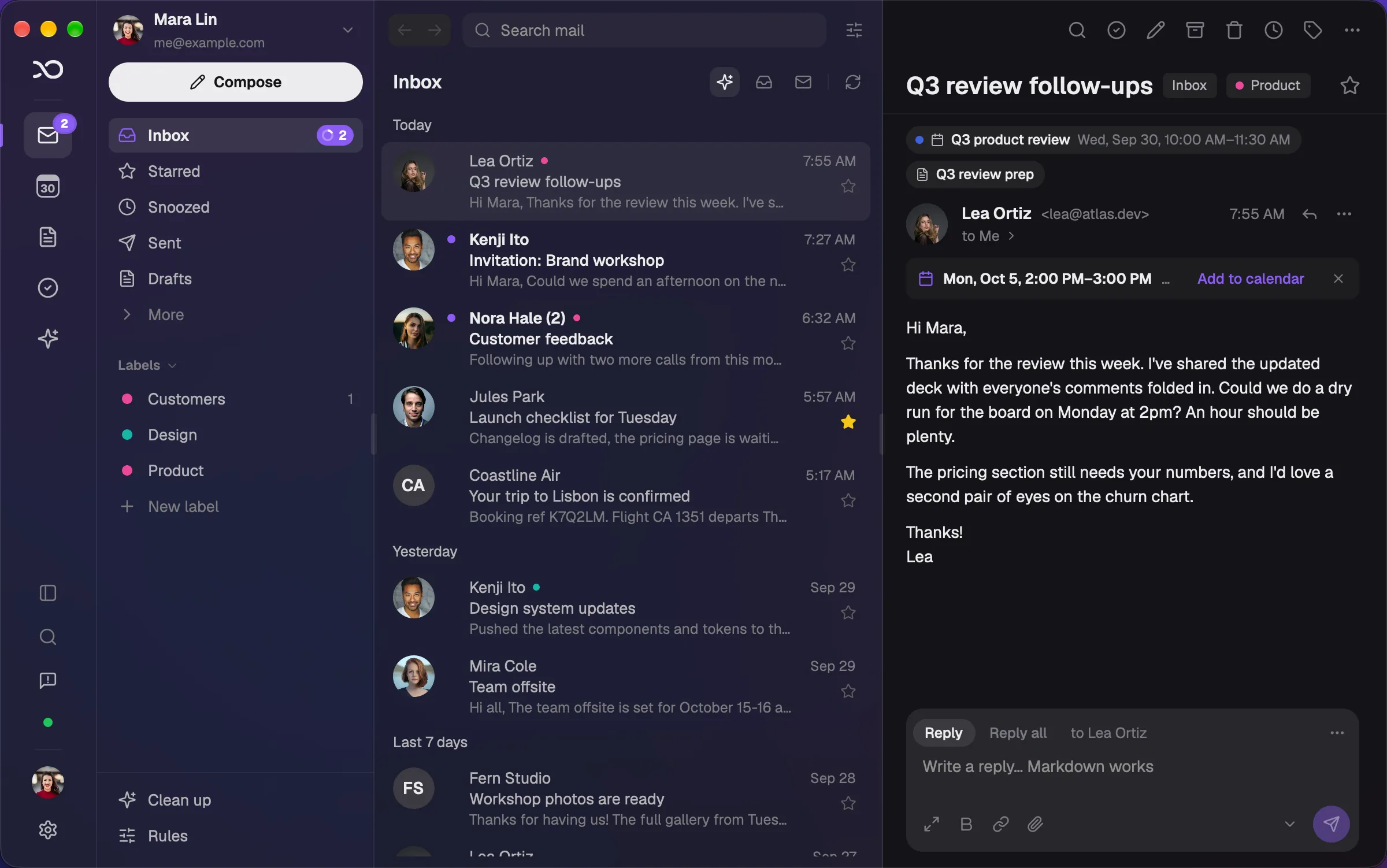
This post is about how that works, where AI comes in, and how we let coding agents run the app to check their own work. If you build desktop apps, we hope it makes you want to try GPUIX.
React, without the browser
GPUIX is an open-source (Apache 2.0) React renderer for GPUI, the GPU interface framework from Zed, the code editor. You write components the way you always have: JSX, useState, hooks, props. React works out what changed, and GPUIX hands that to GPUI, which does the layout, the text and the input, and paints the window on the graphics card.
A component looks like this:
function QuickAdd({ onAdd }: { onAdd: (title: string) => void }) {
  const [title, setTitle] = useState('')
  return (
    <input
      testId="quick-add"
      value={title}
      placeholder="Add a task…"
      onChange={(event) => setTitle(event.value ?? '')}
      onSubmit={() => {
        if (title.trim()) onAdd(title.trim())
        setTitle('')
      }}
      style={{ height: 32, paddingLeft: 12, borderRadius: 8, fontSize: 14 }}
    />
  )
}
If you know React, you can read it. The difference is underneath: there's no DOM and no CSS engine, so nothing has to be turned into HTML and then into pixels.
What that gets us:
- It feels like a Mac app. Scrolling, typing and resizing are drawn at the display's refresh rate. Long lists, like an inbox with tens of thousands of threads, are virtualized, so only the rows on screen are drawn.
- One small app. The app, its runtime (Bun) and the renderer compile into a single executable. Jefi is about 120 MB on disk, and there's no bundled browser in it.
- Work stays off the main thread. Syncing mail runs in a background worker, so the window never waits on the network. It's ordinary TypeScript, with ordinary npm packages for mail, parsing and search.
- The React you already know. Components, hooks and the libraries that don't touch the DOM all come along. So does hot reload: save a file and the running window updates.
It's React, but not the web
A few things work differently, and they're worth knowing before you start:
- Style objects, not stylesheets. Layout is flexbox, written as
styleprops. There are no class names or cascading rules, which in practice means fewer surprises. - Text lives in
<text>. Rich pieces like Markdown, code and virtual lists are built-in elements that GPUI draws natively. - Events are GPUI's. Enter in an input arrives as
onSubmit, and a click goes to what's painted under the pointer. Once you know the rules, they're consistent. - It's young. GPUIX is before 1.0, so pin its versions and upgrade them together, as its README says.
AI in Jefi
Jefi has AI features, and they're off until you turn them on: an assistant, summaries, and suggested tasks from a conversation. When you do, you bring your own Anthropic key, OpenAI key or Codex sign-in, and requests go from your Mac straight to the provider you chose. We don't have a server in the middle, and we never see your mail. Dates like "Thursday at 3pm" are read on your Mac without AI at all.
AI in how we build it
The bigger change is in how Jefi gets made. Much of the code is written by coding agents, like Claude Code, working from an issue tracker they can read and update. A person decides what to build and reviews what comes back.
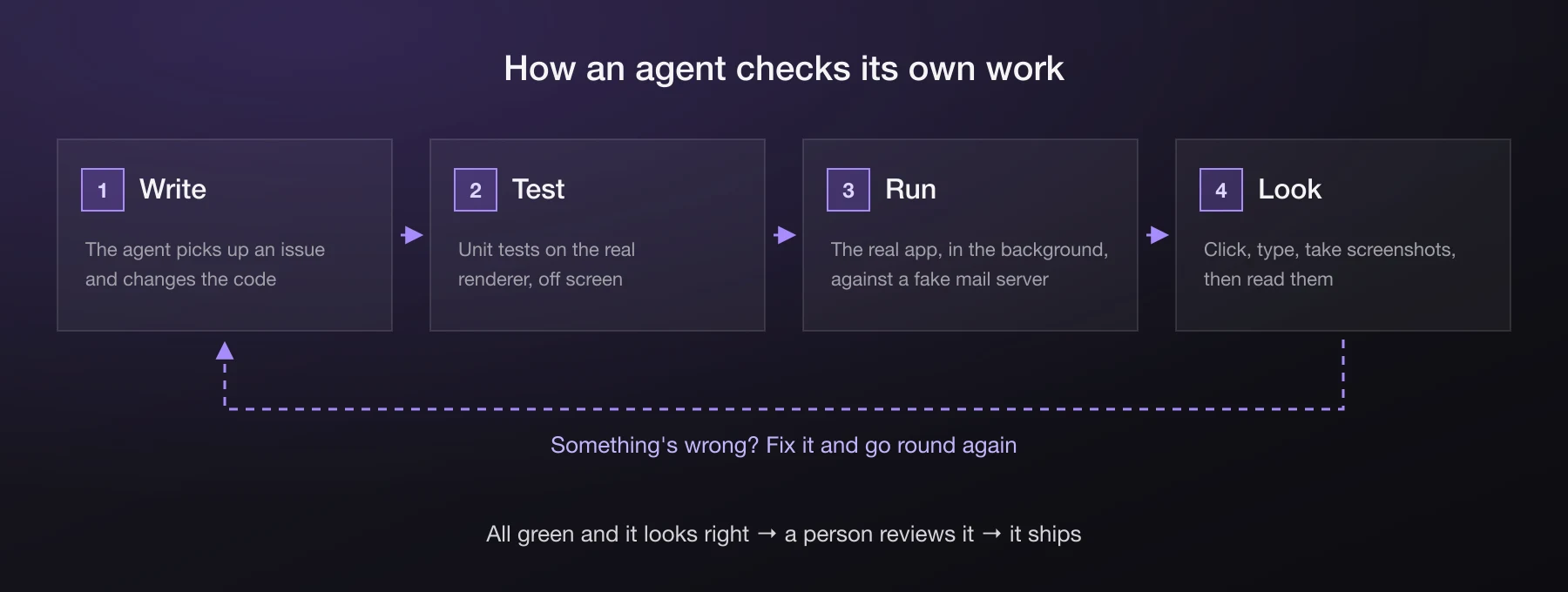
An agent that can only read and write code is guessing. It can make the tests pass and still ship a button that's hidden behind another one, or text that runs off the edge. So we give it what a person has: it can run the app, use it and look at it.
Tests on the real renderer
GPUIX comes with a test renderer that runs the same layout, painting and event handling as the real app, off screen, without opening a window. Tests use Playwright-style locators:
import { createTestRoot } from '@gpuix/react/testing'
import { connectTest } from '@gpuix/react/automation'

test('Enter adds the task', async () => {
  const added: string[] = []
  const { render, renderer } = createTestRoot()
  render(<QuickAdd onAdd={(title) => added.push(title)} />)
  const app = await connectTest(renderer)

  await app.getByTestId('quick-add').fill('Send the deck Friday 3pm')
  await app.getByTestId('quick-add').press('enter')

  expect(added).toEqual(['Send the deck Friday 3pm'])
})
Because the clock can be paused and moved forward, animations and timers are testable too. Jefi has more than 800 tests, and an agent runs them after every change.
The real app, in the background
Unit tests don't catch everything, so the agent also launches the real app. It starts Jefi against a fake mail server with made-up mail, so no real account is ever touched, and drives it:
import { launch } from '@gpuix/react/automation'

const app = await launch({
  command: 'bun',
  args: ['src/mail.tsx'],
  env: { GPUIX_BACKGROUND: '1', ...fakeMailServer.env },
})

await app.getByText('Design review').click()
await app.getByTestId('make-task').click()
await app.screenshot({ path: 'tmp/make-task.png' })
GPUIX_BACKGROUND=1 opens the window behind everything else. Clicks go to what was last painted, and screenshots are read straight from the graphics card, so none of it needs the window in front. The agent works while you keep typing in your editor.
Then the agent looks at the screenshots. That's how it catches the things tests miss: a label cut off, a menu under the wrong button, a colour that's wrong in dark mode. It fixes what it finds and goes round again.
Every screenshot of Jefi on this site was taken this way, by a script driving the real app with made-up mail.
Lessons that stick
When an agent learns something the hard way, like which element receives a click or why a corner painted dark, it's written down where the next agent will read it, and the bug gets a test so it can't come back. Over time that adds up: fewer mistakes are made twice, by agents or by us.
Try GPUIX
If you're building a desktop app and want React without the weight of a browser, GPUIX is worth an afternoon:
bunx @gpuix/cli new my-app
cd my-app
bun run dev
There's more on gpuix.dev and in the GitHub repository, including how to package the app and ship updates.
And if you'd like to see what it can do, Jefi is free to try for 14 days.